Regional anatomy
Examine the lungs and neighbouring structures from different orientations.
Explore Medical ImagingProfessional use cases
Use 3D imaging to explain thoracic anatomy, study selected cases, and support surgical education.
Workflow
Import a DICOM dataset, select the relevant views, and use the anatomy as a shared reference.
Applications
Use patient-specific imaging as an anatomical reference for teaching and professional discussion.
Examine the lungs and neighbouring structures from different orientations.
Explore Medical ImagingPrepare views of supported structures to focus the session on selected anatomical relationships.
Explore Medicalholodeck AI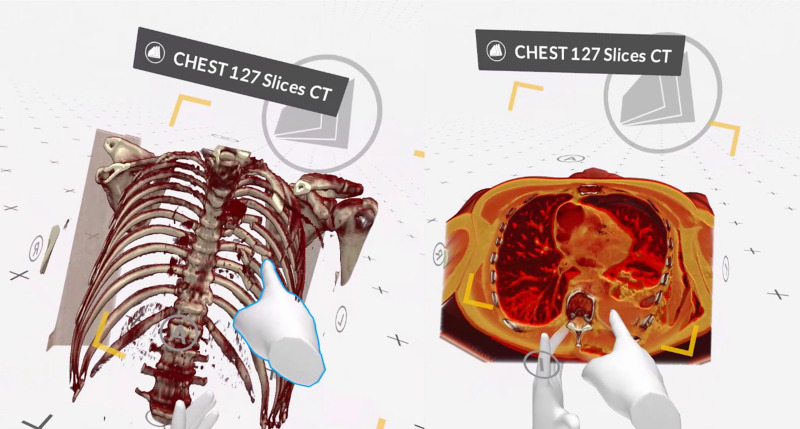
Thoracic anatomy teaching requires learners to relate structures within a complex region. A volumetric reference can establish the position of the lungs and surrounding anatomy, while source slices provide the corresponding cross-sectional information. The instructor can move between these representations to explain the relationships illustrated by a selected dataset.
A case-based session can focus on a defined anatomical topic rather than explore the entire volume. Prepared views can introduce the region as a whole before the instructor concentrates on relevant structures. Participants can examine the same relationship from several directions and connect it with the imaging views used in the explanation.
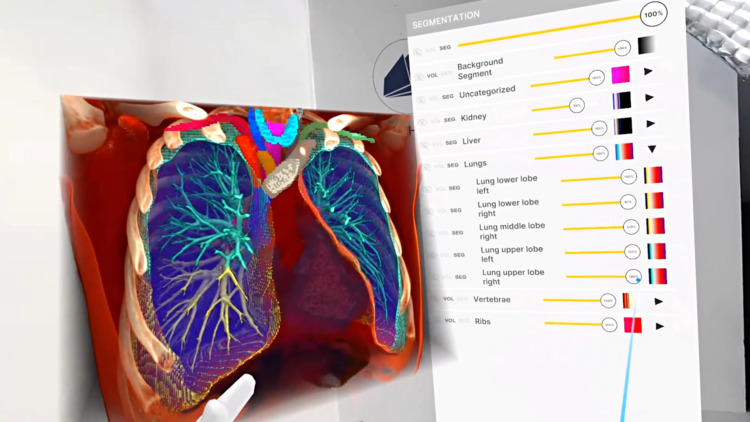
Segmentation can prepare focused views of supported structures for teaching. The broader volume remains useful when surrounding anatomy is important to the discussion. Showing both focused and contextual views makes the role of the prepared visualization explicit.
A teaching session can ask participants to identify landmarks, describe neighbouring structures, and explain how a region appears in different imaging planes. The instructor can select questions around the experience of the group and the anatomy visible in the case. This gives the discussion a defined scope.
Shared sessions allow local and remote participants to work with the same dataset. Learners can indicate the structures they are describing, compare views, and clarify terminology using the common reference. The session can connect imaging education with regional anatomy teaching across disciplines.
Recorded walkthroughs can preserve the anatomical explanation for later revision. Each recording can address one teaching objective and progress from orientation to selected relationships. The material can accompany a course or support preparation before a subsequent case-based session.
Collaboration
Use TeamXR to teach thoracic cases locally or remotely with the same imaging material.
For instructor-led sessions, teacher mode provides control over participant interaction while the material is explained. A session can combine a prepared presentation with questions and shared exploration, allowing participants to return to the same views when clarification is needed.
Capture voice and 3D interactions with RecordXR for training and later discussion.

Get started
Test the software with representative data. Contact our team about supported devices, licences, and your intended use.
Begin with a dataset and session format that reflect your intended use. Check the required applications, viewing devices, group access, and preparation workflow before choosing a licence. This provides a practical basis for evaluating the setup in your own environment.