HARDWARE GUIDE
Hardware setup
Compare desktop, standalone VR, mobile AR, and Remote Rendering configurations for Medicalholodeck. Select a setup based on your workflows, dataset size, and deployment requirements.
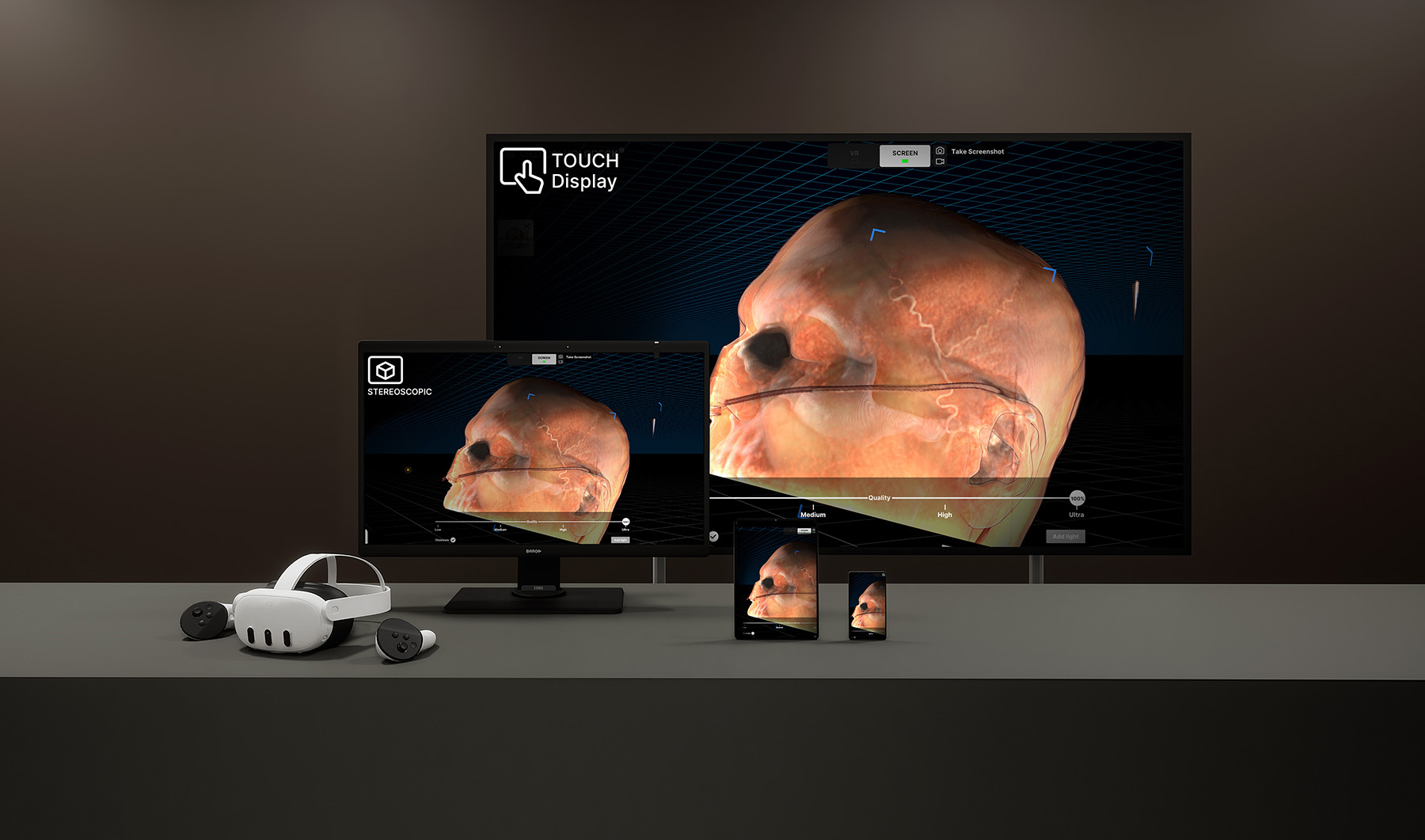
CONFIGURATION COMPARISON
Compare the four setups
Desktop and remote systems provide computing capacity for larger datasets and advanced processing. Standalone and mobile devices offer simpler access for teaching and training.
| Configuration | Processing | Applications | Key considerations |
|---|---|---|---|
| Desktop & displays | Local workstation | Large DICOM datasets, multiple imaging modalities, and AI segmentation | Requires a capable PC; supports VR, stereoscopic 3D, and standard 2D displays |
| Standalone VR | On the headset | Anatomy learning, teaching content, and basic DICOM visualization | No external PC; limited by headset processing capacity |
| Mobile AR | On an iPad or iPhone | Teaching demonstrations and medical visual communication | Touch-based interaction; limited capacity for large or complex datasets |
| Remote Rendering | Remote server | Large datasets and advanced visualization on connected devices | Requires a rendering server and a suitable network connection |
Device compatibility and system requirements are listed in the technical specifications.
DESKTOP & DISPLAYS
Desktop visualization and shared displays
A PC-based setup runs Medicalholodeck on VR headsets, glasses-free stereoscopic 3D displays, and standard 2D screens. Rendering and computation take place on the workstation, with connected displays showing the same spatial dataset.
A dedicated graphics card and sufficient memory support large DICOM datasets, multiple imaging modalities, and AI-based segmentation. Users can access the same scene through different displays while maintaining individual viewpoints.
- Hardware
- High-performance PC with a compatible headset or display
- Processing
- Local rendering and segmentation
- Suited to
- Advanced visualization, research, and shared teaching environments
Glasses-free stereoscopic displays
Stereoscopic displays present a different image to each eye to create a perception of depth. Supported glasses-free displays use eye tracking to provide a spatial view without a headset or special glasses.
Display options include Acer SpatialLabs, Samsung Odyssey 3D, and Barco Eonis. Contact our team to confirm the configuration for your deployment.
STANDALONE VR
Immersive learning without an external PC
Standalone headsets combine display, tracking, input, and computing in a single device. Medicalholodeck runs directly on the headset, supporting deployment in classrooms, skills labs, and training spaces.
Users can explore anatomical models, teaching content, and basic DICOM datasets. Larger datasets, complex scenes, and AI-based processing require a desktop or Remote Rendering configuration.
- Hardware
- Compatible Meta Quest or Pico 4 Ultra headset
- Processing
- On-device rendering; no local segmentation
- Suited to
- Anatomy education and immersive training
MOBILE AR
Spatial visualization on iPad and iPhone
The Medicalholodeck AR app places anatomical models and DICOM data in the surrounding environment. Touch gestures and device movement let users rotate, scale, and inspect structures from different perspectives.
Mobile AR supports teaching demonstrations and medical communication without additional display hardware. Large datasets, advanced rendering, and AI segmentation require desktop or remote processing.
- Hardware
- Supported iPad or iPhone
- Processing
- On-device rendering; no local segmentation
- Suited to
- Teaching demonstrations and portable 3D visualization
REMOTE RENDERING
Centralized processing for connected devices
A remote server performs computation and rendering, then streams the result to a local headset. This provides access to complex spatial datasets without a high-performance PC at each user’s location.
Centralized infrastructure can support deployment across rooms, buildings, or institutions. Network capacity and connection quality are essential considerations when planning this configuration.
Learn about Remote Rendering- Hardware
- Rendering server and compatible connected headset
- Processing
- Server-based rendering and segmentation
- Suited to
- Advanced datasets and centralized deployment
- Requirements
- Review network requirements in the technical specifications
Plan your configuration
Discuss your applications, dataset requirements, and deployment environment with our team.