
2.4 Multiplanar
2.4.V1.9-01
Displays DICOM data in the three standard anatomical planes: axial (inferior to superior), coronal (anterior to posterior), and sagittal (left to right). Selecting show multiplanar opens these views alongside the main imaging panel, enabling detailed anatomical assessment from multiple perspectives.
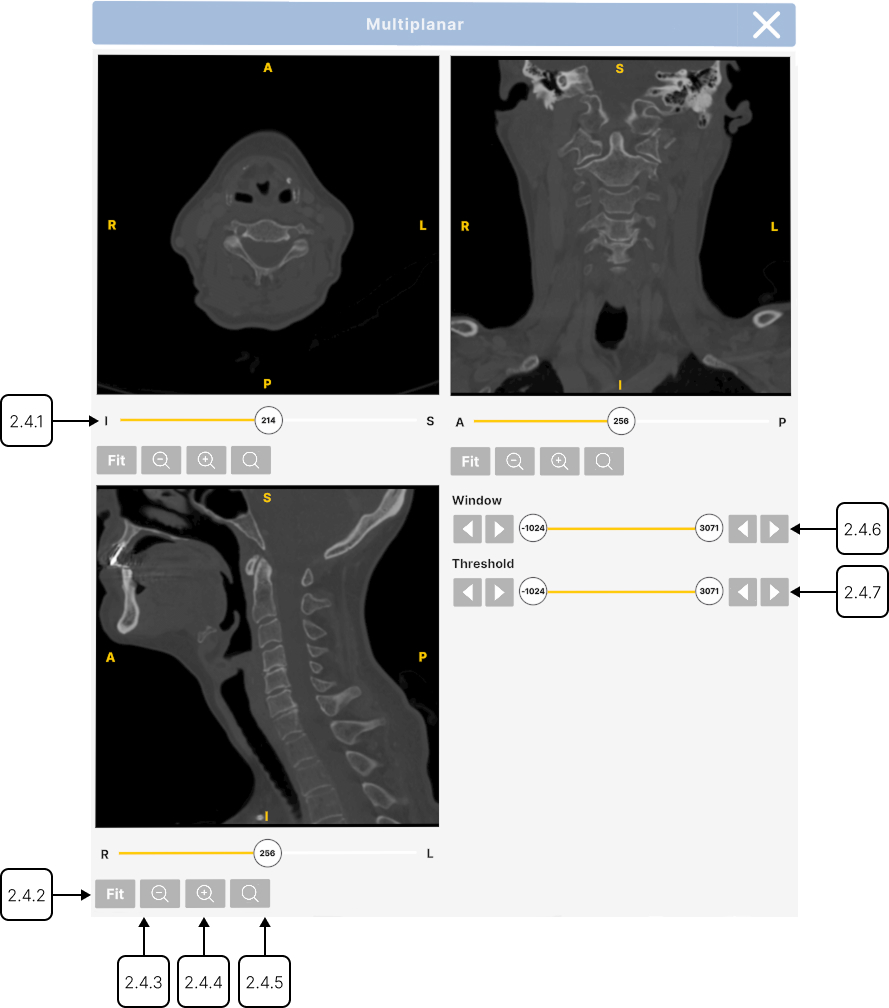
2.4.1
Slider
2.4.1.V1.9-01
Allows you to scroll through all the slices along the selected axis.
2.4.2
Fit
2.4.2.V1.9-01
Resets the zoom level to fit the image in the view.
2.4.3
Zoom out
2.4.3.V1.9-01
Press to zoom out the view. Alternatively, press and hold the trigger, then drag your hand downward.
2.4.4
Zoom in
2.4.4.V1.9-01
Press to zoom in the view. When zoomed in, drag the image to view other areas.
2.4.5
Controller zoom
2.4.5.V1.9-01
Press and hold the trigger, then drag your hand upward.
2.4.6
Window
2.4.6.V1.9-01
Adjusts the range of grayscale values displayed. Select the slider with the trigger and move the slider left or right, then release. Use the arrows to decrease/increase the value.
2.4.7
Threshold
2.4.7.V1.9-01
Sets the displayed Hounsfield Unit (HU) range. Select the slider with the trigger and move the slider left or right, then release. Use the arrows to decrease/increase the value.