6.2 RecordXR panel
6.2.V1.9-01
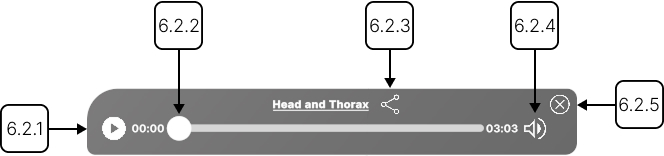
The RecordXR panel appears at the bottom of the application after you select a recording. During playback, you can move around the scene and interact with its datasets and models.
6.2.1
Play/pause
6.2.1.V1.9-01
Starts or pauses the recording.
6.2.2
RXR slider
6.2.2.V1.9-01
Drag the slider to move forward or backward in the recording.
6.2.3
Export
6.2.3.V1.9-01
Save the selected recording to your output directory in a .RXR format.
6.2.4
Mute/unmute
6.2.4.V1.9-01
Mutes or unmutes the recording's audio.
6.2.5
Close
6.2.5.V1.9-01
Closes playback and removes the recording from the workspace.