
1.2 Sidebar
1.2.V1.9-01
The sidebar appears on the right side of the screen and contains tools for managing data and settings.
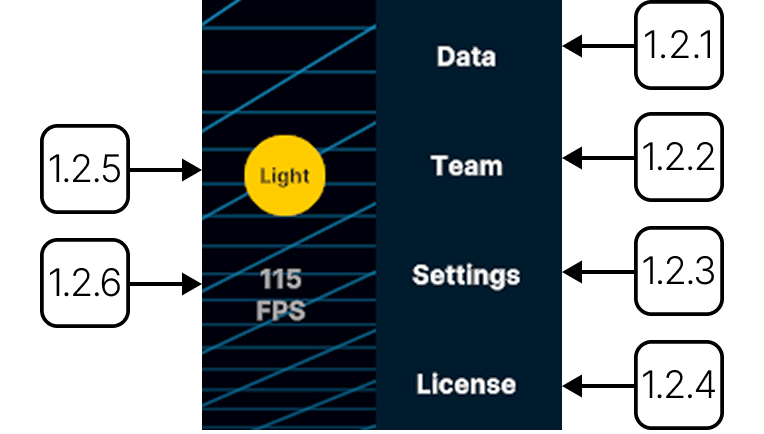
1.2.1
Data
1.2.1.V1.9-01
Opens the library to browse and load datasets.
1.2.2
Team
1.2.2.V1.9-01
Create, join, or manage team sessions.
1.2.3
Settings
1.2.3.V1.9-01
Configure system settings.
1.2.4
License
1.2.4.V1.9-01
Manage license details.
1.2.5
Full screen
1.2.5.V1.9-01
Switches the display between full screen and windowed mode.
1.2.6
Manual
1.2.6.V1.9-01
Opens the Medicalholodeck manual page in your browser.
1.2.7
Support
1.2.7.V1.9-01
Opens the Medicalholodeck support page in your browser.
1.2.8
Exit
1.2.8.V1.9-01
Close the application.
1.2.9
Reset scene
1.2.9.V1.9-01
Removes all loaded datasets and models from the current workspace.
1.2.10
Light/dark mode
1.2.10.V1.9-01
Switches the background between light and dark mode.
1.2.11
3D screen
1.2.11.V1.9-01
Switches the display to a 3D screen. This button is only active when a 3D screen is connected.
1.2.12
Frame rate
1.2.12.V1.9-01
Shows the current frame rate in frames per second to monitor your computer's performance.